Showing posts with label The tech in me. Show all posts

Sunday, May 16, 2010

How to tilt the Samsung Syncmaster B2230 forward or backward tutorial

I read in their official website and from other users that this Samsung B2230 has a tilt function. However I was a little puzzled how to tilt the Samsung B2230. This is because the connector to the LCD look seamless and it does not look like it can budge. I tried pushing here and there but nothing move. On the first few attempts of pushing the lcd, it blink and there was no image. I could not find a solution on how does the other users manage to tilt the LCD. Was a little apprehensive that I will break the LCD after a few tries but in the end manage to tilt it. Enlarge the top photo to see the summary.

How to tilt the Samsung B2230.
-Stand in front of the LCD
-Right hand: Grip the Stand Connector (pink colour)
-Left hand: Grip the top of the lcd (green colour)
Stabilize the LCD by gripping the connector tightly with your right hand.
Using your left hand push the lcd backward bravely and carefully.


It look seamless like it wont budge. Picture shows that it tilt forward.


It wont budge if you tilt it incorrectly. Picture shows that it tilt backward.


Left picture shows that it tilt backward. Right picture shows that it tilt forward. Both shows the maximum view of tilting backward and forward.

Update*
Thank you for supporting my blog and for all your comments! I really appreciate that readers leave comments! Have fun watching and using your Samsung LCD!

Related post:
Samsung SyncMaster B2230 Unboxing / Review

Tuesday, May 4, 2010

Microsoft Wireless Desktop 3000 Unboxing

While exploring Funan IT Mall in Singapore, I stumble on a Microsoft Wireless Desktop 3000 that I have wanted but which I did not purchase in Grex Multimedia shop in JB. I bought my Microsoft Wireless Desktop 3000 from Notebook.com Pte Ltd. They charge me $60 + 7% gov tax.

Previously I did not buy from Grex as it is price at RM195. If you do the maths, the one sold at Grex Multimedia is more expensive by approximately RM42. So i was happy at the good price that I get from Singapore. But beware although the keyboard is cheap (compare with Grex - other JB pc shop price might be cheaper), some of the accessories are still cheaper in Malaysia. For example challenger sold their 4gb SanDisk pendrive for $19 but in Malaysia its sold for RM30. So its best to do some home work if you have the time.

The front of the packaging

The description

It can support 30 foot range. The Blue track technology enable it to work on various surface.
Notice the white dot on the corner rite top side? It indicate when you need to change battery.

Both the keyboard and mouse is really beautiful. I also saw the Microsoft Wireless Desktop 5000. The shape and size is also fantastic. But since i have a budget, i stick with my Wireless Desktop 3000.


Both the keyboard and mouse each uses 2 battery size AA. In the packaging they have provided 4 Energizer batteries. The white color pendrive in the picture is the "Snap-in Mini-Transceiver" of the mouse and keyboard. I was told that the primary receiver of the keyboard is the mouse followed by the Transceiver. If you plan to be away and wanted to save battery then you can take out the transceiver and snap it into the mouse. There is also a battery symbol at the edge of the keyboard to indicate the battery level. So far I am happy with its performance. I like it that i can bring the mouse to my bed and I can control the computer at a distance.

Tuesday, April 27, 2010

HTC HD2 - How to convert video to resolution 480 x 800 tutorial


Picture shows the result of converting to 480 x 800. You can see the subtitle clearly. Using the wrong resolution will cost part of the video especially the subtitle to be crop out.


I just bought the HTC HD2. The screen is really big at 4.3 inch. I bought it because i wanted to watch video. When I first started using it I have a big problem looking for the right video converter software at 480 x 800 resolution. I tried various software and manage to get one that is perfect for HD2 video converting.


The software i use is Xilisoft software. They do not have the option to specifically convert video for HD2 mobile phones but they can convert 480 x 800 resolution using other phone setting. I trial and error many times with different software and finally hit the right one software. I wanted to find the exact resolution for HD2 as I wanted to watch japanese anime with subtitles. If i use other resolution then the video size will be crop and I will not be able to view the subtitle.


How to convert to video resolution 480 x 800.
1. Go to Profile - Android - Nexus One Mpeg
2. Under video codec change the Video Size to 800 x 480.
3. Add files. You can add single or multiple files
4. Convert.

I like this software because its easy to use, can add multiple files quickly and let it convert while i sleep. Plus most of all it has the resolution that i required for HD2.

Friday, April 16, 2010

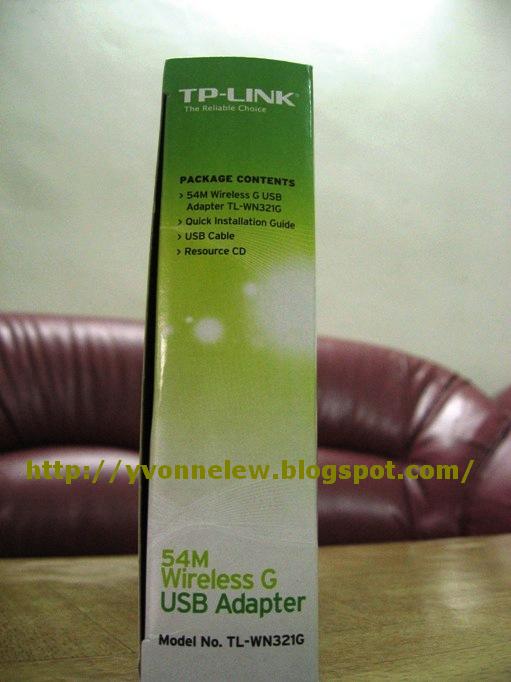
TP-LINK: 54Mbps Wireless USB Adapter (TL-WN321G)

The packaging looks professional considering its a China product. Their price is also very competitive. The Belkin line would cost at least RM50

Description


54Mbps Wireless USB Adapter (TL-WN321G), Quick Installation Guide
USB cable, CD


Specification

BELKIN Surge Strip Surge Protector - Economy series F9E410sa2M (Unboxing/Review)

BELKIN Surge Strip Surge Protector - Economy series F9E410sa2M. RM59 bought from PC fair. It has a lifetime warranty. If damage either go to the shop that i bought from or call the toll line for replacement. Should the plug be damage you can get a one-on-one replacement. In addition there is a RM1000 coverage should your appliance be damage during lightning strike. The claims will be base on the current market value of your fried equipment.
In addition the plug is 4 socket and can support phone line.

Strangely i could not find this model in Belkin official website. Only can find this model littered over the internet by other retailers....

The back of the packaging stating description


Yellow colour: My economy series protect up to 13000 Amps with a max RM1000 claim. When i buy i did not understand why there is a price segment so i bought the cheapest model. I understand once i read the explanation at the back. Looks like 13000 is actually pretty low!! In the internet the usual lightning can be from 5,000 - 20,000 amps. Or bigger ones up to 200,000amps!

Red colour: Home series up to 25,000 Amps/1181 Joules. Recommend for personal computers, up to 27" TV, phone/fax/modem. Warranty claim RM5,000

Blue colour: Superior series up to 45,000 Amps/1940 Joules. Recommend for Laser printers/scanners, all TV, audio/video components. Warranty claim RM10,000

Mustard colour: Gold series up to 90,000 Amps/3240 Joules. Recommend for professional workstation, home theater systems, Ethernet networks. Warranty claim up to RM25000.

Lifetime warranty

Instruction manual

My modem is protected also. Insert the phone in Input. Output is the cable to the modem.

4 plugs. If you notice there is only 1 switch. A little annoying that there is only 1 switch when I only wanted to restart certain switch at times like my modem when there is suddenly no internet connection.

Links below shows the review when they claim the Belkin warranty. Looks like we should not take for granted that if we have the surge protector that we should be 100% assured that our electrical components will not be fried from lightning. All the user below use more expensive models than me and their computer still has been fried. The claims are valued base on the current market price of your equipment. And general comment is that we should call the local Malaysia office at 1800 81 2076 or +60 3 7983 3010 instead of the international number that route to India or Philippines. Hem... not sure how i am goin to claim mine when i stay in JB though...............

Related topics from other blog:
Kena Lightning!!! Belkin support in Malaysia!!! (Part 1)
Kena Lightning!!! Belkin support in Malaysia!!! Update!!! (Part 2)
Belkin support in Malaysia
Belkin Warranty Review

Related topics from own blog:
Bought new gadget due to lightning strike
Samsung SyncMaster B2230 Unboxing / Review

Thursday, April 15, 2010

Samsung SyncMaster B2230 Unboxing / Review

Just bought the Samsung LCD monitor model B2230. Its really beautiful and the graphics are great! I bought this during the PC fair at Persada on April 3rd for RM539.

Samsung SyncMaster B2230


The Unboxing

Specification

Whats inside:
1. Manuels: Quick Setup Guide, Warranty Card (shows above with the address in front), User's Guide (CD).
2. Cables: Power Cord, D-Sub Cable, DVI Cable. In short analog and digital cable provided. But HDMI cable not provided.
3. Others: Stand/Support, Stand Connector, Cleaning Cloth.
Free USB cup warmer and Headset.

Since my cpu is pretty old version, I use the DVI cable and kept the analog cable.

Beautiful design with touch screen features

Something different about this LCD as oppose to my BenQ model is the touch screen feature.The button shown:Menu button/Magic bright/Brigtness/Auto Adjustment/ On off button. They look really stylish and beautiful but the part that i dont like is that I need to find the off button in the dark before i sleep.

Magic Eco is a power saving mode. You can adjust 50/75/100% power saving.
Magic angle. You can adjust in the menu whether you are lying down, sitting, standing. Basically you can see the screen clearly from every angle.
1080 HD: Support Full HD
70 000 Dynamic Contrast which is rather high compare to the other competitors.
Soft power off: Consume 0.3walt of power during standby mode. Normally its 45walts. So you can save electricity.


Beautiful design with great display and touch screen buttons. Full HD with 70,000:1 Dynamic Contrast . Can be viewed in every angle plus power saving mode. This LCD is a great buy!

Related post:
How to tilt the Samsung Syncmaster B2230 forward or backward

Bought new gadget due to lightning strike

One day while coming back from work at 7pm I realize that my 19 inch LCD is not working, my modem has only 1 light blinking and my network card has busted. The funny thing is that my dad has already switch off all the plugs at 5pm that day and that on the same day I read the newspaper that there is an ang moh saying that we are quiet ignorant when our country has lots of lightning strike in Malaysia. Looks like even though the plug have been switch off, the lightning still travels from the phone/modem line. Good thing my CPU is relatively working. I use the word relatively as it is still working but now it takes longer time to load. So i am not sure whether there is anything wrong with the CPU.

Now that my electrical gadget has busted and the sadness has dissipated, its time for shopping! I have wanted to fix a wireless connection for a long time and upgrade my LCD but never really got a chance to upgrade since my present ones are working fine till now.

Bought a D-Link Wireless Modem Router DSL-2640T, TP-Link 54Mbps Wireless USB Adapter TL-WN321G and a Samsung B2230 LCD. Price for the modem is RM175 bought from Grex Multimedia which is more expensive than PC Fair price of around RM168. For the TP Link Wireless USB adapter bought for RM38. The price is reasonable compare to Belkin which is around RM50 for the same type of models. The Samsung LCD bought for RM539. Also bought a surge protector this time. I bought the Surge Strip Surge Protector from Belkin - Economy series for RM59 from E Cube Trading. Interestingly Grex Multimedia sold the same surge protector more expensive by about RM10-RM20. This is to share which shop to avoid if you decide to buy any PC equipment. All in all I spend RM811 as a result of a lightning strike. Moral of the story, better be save then sorry pls buy a good surge protector!!

Related Topics:
Samsung SyncMaster B2230 Unboxing / Review
BELKIN Surge Strip Surge Protector - Economy series F9E410sa2M (Unboxing/Review)

Tuesday, September 4, 2007

Game: Wii - cool video game console^^!!

Just tried Wii recently when bro in law bought it. Its really cool ^.^!! I held onto the remote and when i play tennis, its really like i am at the tennis field playing tennis. i am not really into playing games but Wii really get me going~~ Its easy to get hook and time passes quickly. Without realizing it, after a few hours i am actually sweating from playing! Haha its really a great exercise device too :D

LinkWithin

Related Posts with Thumbnails